 #DSaaS (Design System as a Skill)
#DSaaS (Design System as a Skill)
#DSaaS (Design System as a Skill)
agent analyses the image and extracts colours.
for a website, we analyse
screenshots to extract colours (could be tricky)
you will see the extracted colours and styles. you can edit them the way you like.
you can download it for mobile apps, web or if you are feeling adventurous, a combined one.
you can simply place the file in your project folder and ask your agent to refer to the instruction file while creating any components.

AI agents (Cursor, v0, Bolt) are "probabilistic" — they guess styles and omit accessibility, leading to massive technical and legal debt. the issue arises since AI agents can't work with design system infrastructure built for humans.
vibemagic.in — a deterministic framework that converts design systems into a "skill" file, forcing AI to follow 100% compliant rules regardless of context window limitations.
get over the 'AI slop', eliminate context window limitations, and bring your own design system as a skill into your vibe coding projects.
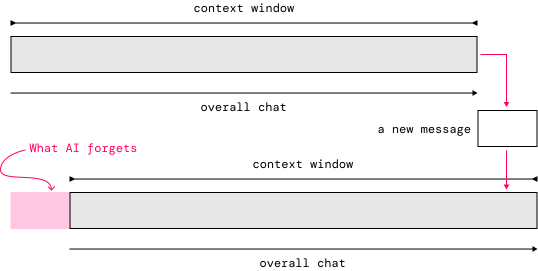
AI agents (Cursor, v0, Bolt) are "probabilistic"—they guess styles and omit accessibility, leading to massive technical and legal debt. what gets removed from context is the visual style explained, typically in message #1.
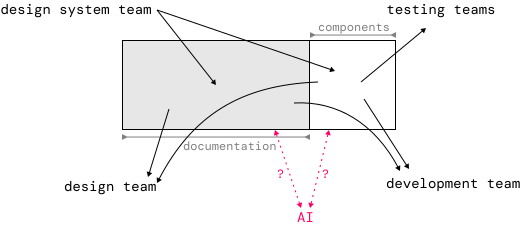
the design systems have been a single source of truth for the humans to produce, refer and build upon. unless published as node installable, these design systems can't be directly used by AI developers.
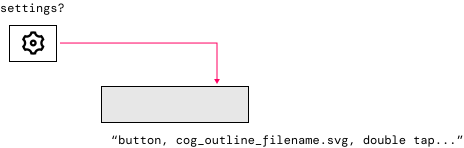
AI builds without checking the elements for contrast and accessibility labels. thus, the AI generated code might not always be accessible.
the solution...
instructions.md file sits in your project folder and gets referred to everytime the AI tried to create a UI component; thus making the visual styling instructions always available!
 1
 2
 3
 4
 5
 6
 7
 8
 9
10
11
12
13
14
15
#### Link Color

| Token | Value | Usage |
|-------|-------|-------|
| `L1` | `#096FE4` | Links and interactive elements |

### 1.2 Corner Radius Tokens

| Token | Value | Usage |
|-------|-------|-------|
| `corner-small` | `4px` | Tags, Pills, small UI elements |
| `corner-med` | `6px` | Buttons, Inputs, Modals |
| `corner-large` | `8px` | Cards, larger containers |
| `corner-full` | `9999px` | Perfectly rounded pill shaped |
instructions.md file has strict non-negotiable instructions to add name-role-value-state labels to all the component it creates, including adding semantic meaning of icons.
also does not allow building a non-regulation sized interactive element.
 1
 2
 3
 4
 5
 6
 7
 8
 9
10
11
12
13
14
15
## 12. Accessibility: Name-Role-Value Requirements

**MANDATORY:** All interactive components MUST include proper
accessibility attributes as specified below. These are not
optional guidelines—implement exactly as shown.

### 12.1 Buttons

| Attribute | Requirement |
|-----------|-------------|
| **Role** | `button` (native `<button>` element preferred) |
| **Name** | Use visible button text as the accessible name |

```html
<button>Submit Form</button>
while building the design system visually inside the tool, whenever a contrast issue is detected, the tool highlights it immediately. based on the light colors, it can auto-generate suitable dark mode tokens without human intervention.
 1
 2
 3
 4
 5
 6
 7
 8
 9
10
11
12
13
14
15
#### Neutral Semantic Mapping

| Role | Light Mode | Dark Mode |
|------|------------|-----------|
| Background Primary | N9 `#FFFFFF` | ND9 `#0F172A` |
| Background Secondary | N8 `#F8FAFC` | ND8 `#334155` |
| Background Tertiary | N7 `#F1F5F9` | ND7 `#64748B` |
| Background Deep | N6 `#E2E8F0` | ND6 `#94A3B8` |
| Outline | N5 `#CBD5E1` | ND5 `#CBD5E1` |
| Outline Solid | N6 `#E2E8F0` | ND6 `#94A3B8` |
| Outline Dim | N4 `#94A3B8` | ND4 `#E2E8F0` |
| Content Disabled | N4 `#94A3B8` | ND4 `#E2E8F0` |
| Content Lighter | N3 `#64748B` | ND3 `#F1F5F9` |
| Content Light | N2 `#334155` | ND2 `#F8FAFC` |
| Content Primary | N1 `#0F172A` | ND1 `#FFFFFF` |